

Writing a sentence that sounds right is not always enough. A sentence can look fine at first glance but still contain a subject-verb agreement error, misplaced punctuation, awkward wording, or an incorrect verb tense.
- What Is QuillBot Grammar?
- Why Do People Search for QuillBot Grammar?
- How Does QuillBot Grammar Checking Work?
- How to Use QuillBot Grammar Checker
- Step 1: Prepare Your Text
- Step 2: Enter or Paste Your Writing
- Step 3: Review the Suggestions
- Step 4: Understand the Correction
- Step 5: Proofread the Final Version
- What Types of Grammar Mistakes Can It Help Find?
- QuillBot Grammar Examples: Incorrect vs. Correct
- QuillBot Grammar vs. Manual Proofreading
- Is QuillBot Grammar Accurate?
- When Should You Use a Grammar Checker?
- How to Get Better Results From QuillBot Grammar
- Common Grammar Mistakes to Watch For
- Does a Grammar Checker Replace an English Teacher or Editor?
- Grammar Checking for Students
- Grammar Checking for Bloggers and Website Owners
- Grammar Checking for Professional Emails
- Common Mistakes When Using Grammar Checkers
- Accepting Every Suggestion
- Ignoring the Explanation
- Checking Only Individual Sentences
- Overediting
- Forgetting the Audience
- A Simple Grammar-Checking Workflow
- What Makes Good Grammar More Than Just Correctness?
- Tips for Improving Your Grammar Without Tools
- Read High-Quality English
- Keep a List of Your Common Errors
- Study One Rule at a Time
- Practice With Your Own Sentences
- Frequently Asked Questions About QuillBot Grammar
- Can students use QuillBot Grammar?
- Conclusion: Use QuillBot Grammar as a Writing Assistant
That is where a grammar checker can help.
QuillBot Grammar is a writing tool designed to identify and correct common grammar, spelling, and punctuation problems. Before using any grammar checker, it is also helpful to understand what grammar is and how grammar rules affect clear writing.
But should you simply accept every correction a grammar tool suggests? Not necessarily.
The best approach is to use a grammar checker as a second set of eyes while still understanding why a correction is appropriate. This guide explains how QuillBot’s grammar features work, what types of mistakes they can help with, and how to use them effectively.
What Is QuillBot Grammar?
QuillBot Grammar refers to the grammar-checking functionality available through QuillBot’s writing platform.
You can enter or paste text into the grammar checker, and the tool can identify potential problems involving areas such as:
- Grammar
- Spelling
- Punctuation
- Word usage
- Sentence structure
- Common writing errors
For example:
Incorrect:
She go to school every morning.
Correct:
She goes to school every morning.
The problem is subject-verb agreement. The singular subject “she” requires the verb “goes” in the present tense.
A tool can flag this type of error quickly, but knowing the grammar rule helps you recognize similar mistakes in future writing.
Why Do People Search for QuillBot Grammar?
The search intent behind “quillbot grammar” is mostly practical. People searching for the term may want to know:
- What QuillBot’s grammar checker does
- How to check grammar with QuillBot
- Whether the tool is free
- What types of errors it can detect
- Whether it is accurate
- How it compares with manually proofreading text
- Whether it is useful for students and writers
- How to get better results from a grammar checker
Understanding these questions makes it easier to use the tool effectively rather than treating it as an automatic replacement for proofreading.
How Does QuillBot Grammar Checking Work?
A grammar checker analyzes the text you provide and looks for patterns that may indicate errors. An AI writing assistant can also help writers improve clarity, wording, and overall writing quality.
Depending on the sentence, it may recognize problems with grammar, spelling, punctuation, or usage and suggest a revision.
Consider this example:
Incorrect:
The group of students are preparing for the exam.
A grammar checker may identify the agreement issue.
Better:
The group of students is preparing for the exam.
Why?
The main subject is “group,” which is singular. The phrase “of students” describes the group but does not change the grammatical number of the main subject.
This illustrates an important point: grammar checking is not simply about replacing words. Understanding the structure of a sentence still matters.
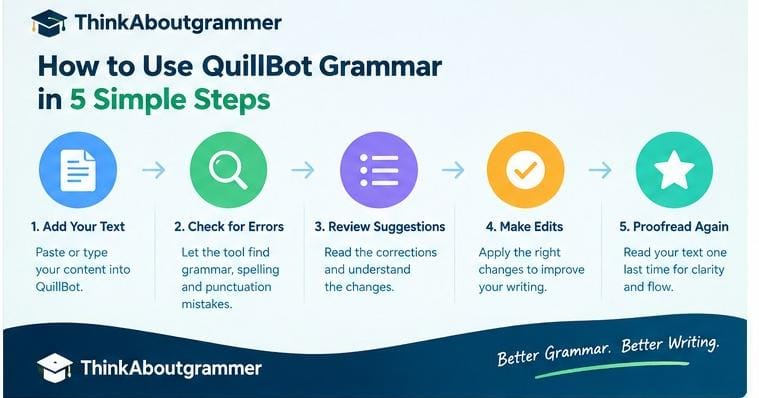
How to Use QuillBot Grammar Checker
Using a grammar checker is generally straightforward.
Step 1: Prepare Your Text
Write your paragraph, essay, email, article, or other content first.
Do not worry about making every sentence perfect before checking it. The purpose of proofreading software is to help identify potential problems.
Step 2: Enter or Paste Your Writing
Place your text into the grammar-checking interface.
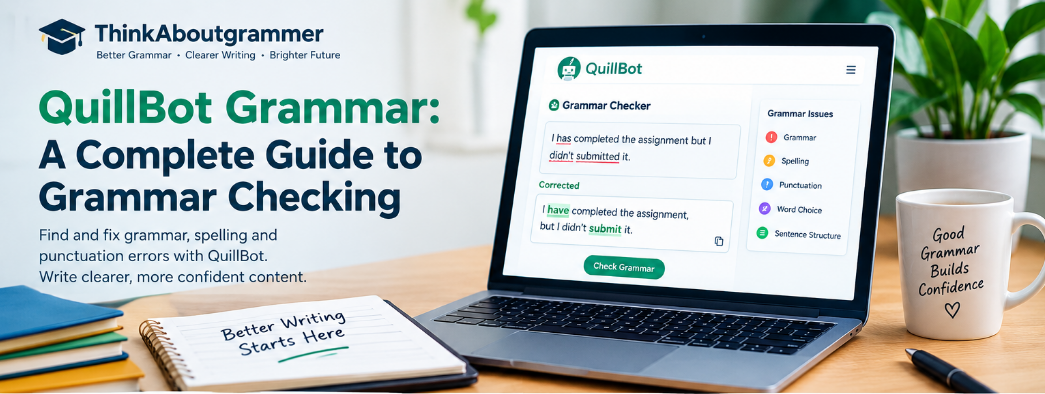
For example:
I has completed the assignment but I didn’t submitted it.
Step 3: Review the Suggestions
The tool may identify more than one issue.
A corrected version could be:
I have completed the assignment, but I didn’t submit it.
Notice that two different grammar concepts are involved:
- I has → I have
- didn’t submitted → didn’t submit
Step 4: Understand the Correction
Don’t just click every suggested change.
Ask yourself:
- What was wrong?
- What grammar rule applies?
- Does the suggested correction preserve my intended meaning?
- Does the sentence still sound natural in context?
Step 5: Proofread the Final Version
After making changes, read the entire passage again.
A grammar checker can identify many mechanical problems, but human review remains important for meaning, tone, organization, and context.
What Types of Grammar Mistakes Can It Help Find?
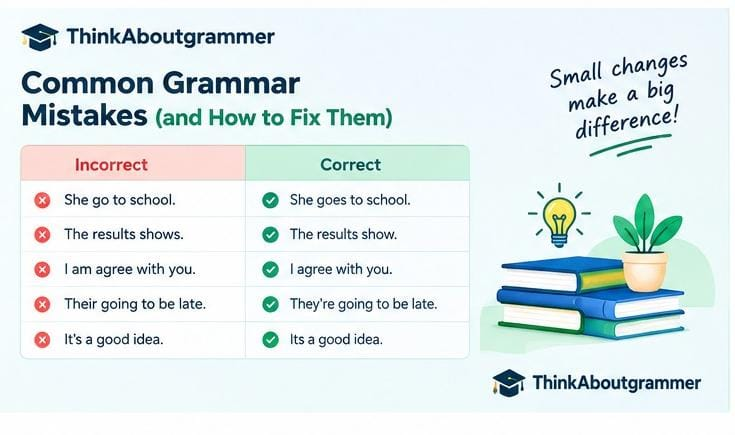
A grammar checker can be useful for several common categories of writing errors.
Subject-Verb Agreement
The verb should agree with the subject.
Incorrect:
The results shows a significant difference.
Correct:
The results show a significant difference.
Verb Tense
Verb tense should match the time being discussed.
Incorrect:
Yesterday, I go to the library.
Correct:
Yesterday, I went to the library.
Articles
English articles such as a, an, and the can be difficult for learners.
Incorrect:
She is excellent teacher.
Correct:
She is an excellent teacher.
Pronoun Agreement
Pronouns should clearly refer to the appropriate nouns.
Unclear:
When Sarah spoke to Emma, she was worried.
Who was worried—Sarah or Emma?
A grammar checker may not always resolve ambiguity perfectly. The writer may need to rewrite the sentence:
Sarah was worried when she spoke to Emma.
Punctuation
Punctuation can significantly affect readability.
Incorrect:
Let’s eat Grandma.
Correct:
Let’s eat, Grandma.
The comma changes the meaning completely.
Spelling
Simple spelling errors can distract readers.
Incorrect:
The results were consistant.
Correct:
The results were consistent.
Sentence Structure
Long or poorly constructed sentences may be difficult to read.
Weak:
I finished the report I sent it to my teacher she said that I needed to make some changes.
Better:
I finished the report and sent it to my teacher. She said that I needed to make some changes.
Breaking ideas into separate sentences makes the writing easier to follow.
QuillBot Grammar Examples: Incorrect vs. Correct
Seeing grammar rules in context is often more useful than memorizing definitions.
| Grammar Problem | Incorrect | Correct |
|---|---|---|
| Subject-verb agreement | He walk to work. | He walks to work. |
| Past tense | She go yesterday. | She went yesterday. |
| Article | I bought new laptop. | I bought a new laptop. |
| Plural noun | Two childs were playing. | Two children were playing. |
| Modal verb | You should to study. | You should study. |
| Apostrophe | The students book is here. | The student’s book is here. |
| Comparative form | This is more easier. | This is easier. |
| Preposition | She is good in English. | She is good at English. |
The important lesson is that corrections are more valuable when you understand the underlying rule.
QuillBot Grammar vs. Manual Proofreading
Grammar software and human proofreading serve different purposes.
A grammar checker is useful for quickly scanning text for potential errors. Manual proofreading, however, allows you to consider meaning and context more deeply.
For example:
The manager discussed the project with the employee who was concerned.
Grammatically, the sentence may be acceptable. But it could still be unclear whether the manager or employee was concerned.
A human editor can recognize that ambiguity and rewrite it:
The manager discussed the project with the concerned employee.
Or:
Concerned about the project, the employee discussed it with the manager.
The best workflow combines automated checking with careful human review.
Is QuillBot Grammar Accurate?
No grammar checker should be treated as infallible.
English contains many sentences where more than one construction can be grammatically acceptable. Context, dialect, tone, audience, and writing purpose can all affect whether a particular suggestion is appropriate.
For example:
The team is meeting today.
This is standard in many contexts.
In some varieties of English, collective nouns may sometimes take plural agreement:
The team are meeting today.
The appropriate choice can depend on the variety of English being used and the intended style.
Therefore, treat grammar suggestions as recommendations rather than unquestionable rules.
When Should You Use a Grammar Checker?
A grammar checker can be particularly helpful when you are:
- Writing an essay
- Drafting an email
- Creating a blog post
- Preparing a report
- Writing academic content
- Learning English
- Editing website content
- Proofreading a resume
- Checking business communication
- Reviewing a long document
It can be especially useful after completing a first draft.
Instead of stopping every few sentences to fix minor errors, you can finish your thoughts first and then run a grammar check.
How to Get Better Results From QuillBot Grammar
A few simple habits can make grammar checking more useful.
Write Clearly Before Checking
Do not depend on software to turn unclear ideas into excellent writing.
Start with a clear message.
Less clear:
The reason why the meeting was delayed was because there was a problem that happened with the schedule.
Clearer:
The meeting was delayed because of a scheduling problem.
The second sentence is shorter and easier to understand.
Check the Context
Never accept a suggestion without reading the entire sentence.
A word can be grammatically correct but inappropriate for the meaning you intend.
Learn From Repeated Errors
If the same type of correction appears repeatedly, learn the rule behind it.
For example, if you repeatedly write:
He don’t…
you may need to review subject-verb agreement with do and does.
Correct forms include:
He doesn’t like coffee.
and:
They don’t like coffee.
Read Your Writing Aloud
Reading aloud is an excellent final proofreading technique.
You may notice:
- Repeated words
- Missing words
- Awkward transitions
- Extremely long sentences
- Unclear phrasing
- Punctuation problems
A sentence that looks fine on screen may sound awkward when spoken.
Common Grammar Mistakes to Watch For
Even with a grammar checker, writers should know the errors they commonly make.
Your vs. You’re
Your indicates possession.
Your book is on the desk.
You’re means you are.
You’re going to enjoy this book.
Its vs. It’s
Its shows possession.
The company changed its policy.
It’s means it is or it has.
It’s a useful tool.
Their vs. There vs. They’re
Their indicates possession:
Their house is nearby.
There refers to a place or introduces something:
The keys are over there.
They’re means they are:
They’re ready to leave.
Fewer vs. Less
Use fewer with countable items:
There are fewer mistakes in the second draft.
Use less with uncountable amounts:
The second draft contains less unnecessary information.
Affect vs. Effect
Affect is commonly used as a verb:
Lack of sleep can affect concentration.
Effect is commonly used as a noun:
Lack of sleep can have an effect on concentration.
These words can have other grammatical uses, so context matters.
Does a Grammar Checker Replace an English Teacher or Editor?
No.
Grammar software can automate part of the proofreading process, but teachers and editors provide something different: judgment and context.
An experienced teacher can explain why a construction is inappropriate for a particular assignment.
An editor can evaluate:
- Structure
- Tone
- Audience
- Argument
- Consistency
- Clarity
- Style
- Organization
A grammar checker is therefore best viewed as a supporting tool.
Grammar Checking for Students
Students can use grammar tools as part of a learning process.
Suppose a student writes:
The experiment results was unexpected.
The correction is:
The experiment results were unexpected.
Instead of simply accepting the change, the student can learn that results is plural and therefore takes were.
Over time, this approach can turn corrections into grammar lessons.
Students should also follow their school’s or institution’s rules regarding writing and digital tools, particularly for assessed work.
Grammar Checking for Bloggers and Website Owners
Website content needs more than keywords. While an AI writing generator can help with creating an initial draft, grammar checking and human proofreading are still important before publishing.
A blog post can rank for a relevant search term, but poor grammar may make the page harder to read and reduce the professionalism of the content.
Before publishing an article, check for:
- Grammar errors
- Spelling mistakes
- Punctuation problems
- Unclear sentences
- Repeated words
- Inconsistent terminology
- Awkward transitions
- Formatting issues
Then perform a final human review.
Good SEO writing should be useful to readers first.
Grammar Checking for Professional Emails
Professional communication benefits from clarity.
Compare these examples:
Less polished:
I am writing to ask you that if you can send me the files which we discussed yesterday.
Better:
Could you please send me the files we discussed yesterday?
The second version is shorter, clearer, and more direct.
A grammar checker can help catch mechanical errors, but you should also consider whether your email is appropriately polite and concise.
Common Mistakes When Using Grammar Checkers
Grammar software becomes less useful when writers depend on it blindly.
Accepting Every Suggestion
Not every suggestion is necessarily the best choice.
Always consider context.
Ignoring the Explanation
If you repeatedly accept corrections without understanding them, you may continue making the same mistakes.
Checking Only Individual Sentences
A sentence can be grammatically correct but still not fit the paragraph.
Read the complete section after editing.
Overediting
Sometimes writers change perfectly acceptable sentences simply because software suggests an alternative.
Don’t change something merely because another construction is possible.
Forgetting the Audience
Academic writing, casual messages, marketing copy, and business emails may require different styles.
Correct grammar is only one part of effective communication.
A Simple Grammar-Checking Workflow
For most writing projects, this five-step process works well:
1. Write your first draft.
Focus on ideas rather than perfection.
2. Run a grammar check.
Look for obvious grammar, spelling, and punctuation issues.
3. Review each suggestion.
Make sure the proposed change fits your meaning.
4. Read the entire piece.
Check flow, clarity, organization, and consistency.
5. Proofread once more.
Look specifically for mistakes that automated tools may miss.
This workflow keeps technology in its proper role: helping the writer rather than replacing the writer.
What Makes Good Grammar More Than Just Correctness?
Good writing is not simply error-free writing.
Consider:
Due to the fact that the weather conditions were unfavorable, the event was postponed.
The sentence is grammatically acceptable, but it can be more direct:
Because the weather was unfavorable, the event was postponed.
Good grammar works together with clarity, precision, and appropriate style.
That is why effective proofreading should ask two questions:
Is this sentence correct?
and
Is this the clearest way to express the idea?
Tips for Improving Your Grammar Without Tools
Technology can help, but you can also strengthen your grammar skills directly.
Read High-Quality English
Regular reading exposes you to correct sentence structures, vocabulary, punctuation, and natural phrasing.
Keep a List of Your Common Errors
If you repeatedly confuse their, there, and they’re, write the differences down and practice them.
Study One Rule at a Time
Trying to learn every grammar rule at once can become overwhelming.
Start with fundamentals such as:
- Subject-verb agreement
- Verb tenses
- Articles
- Pronouns
- Prepositions
- Punctuation
Practice With Your Own Sentences
Instead of memorizing isolated rules, create examples related to your everyday writing.
For example:
I have finished my homework.
Then change the subject:
She has finished her homework.
This makes the grammatical pattern easier to remember.
Frequently Asked Questions About QuillBot Grammar
Is QuillBot Grammar free?
QuillBot provides grammar-checking functionality, with access and feature availability depending on its current plan and product offerings. Check the official service for the latest details before relying on a particular feature.
What does QuillBot Grammar check?
Its grammar-checking functionality can help identify potential problems involving grammar, spelling, punctuation, and wording. The exact capabilities can change as the service develops.
Is QuillBot good for grammar checking?
It can be useful for finding many common writing errors and providing suggestions. However, it should complement—not replace—human proofreading.
Can QuillBot correct punctuation?
Grammar-checking tools can identify many common punctuation issues, but punctuation suggestions should still be reviewed in context.
Can students use QuillBot Grammar?
Students can use grammar tools as learning and proofreading aids, but they should follow their school’s or institution’s policies concerning digital writing tools and assessed work.
Is a grammar checker better than proofreading?
They serve different purposes. Automated checking is fast and useful for catching common errors, while human proofreading is better at evaluating meaning, context, tone, and clarity. Using both is often the strongest approach.
Can QuillBot fix every grammar mistake?
No automated grammar checker can guarantee that every grammatical or stylistic problem will be identified or corrected. Unusual sentence structures, context-dependent choices, and ambiguous wording may require human judgment.
How can I improve my grammar while using QuillBot?
Pay attention to recurring corrections. Instead of simply accepting them, learn the grammar rule involved and create your own example sentences. This turns proofreading into active learning.
Conclusion: Use QuillBot Grammar as a Writing Assistant
QuillBot Grammar can be a practical way to identify common grammar, spelling, and punctuation problems before you publish or submit your writing.
However, the strongest results come from combining automated suggestions with human judgment.
Use a grammar checker to catch mistakes, learn from repeated corrections, and then read your writing carefully for clarity and meaning. Whether you’re writing a school assignment, blog article, professional email, or report, the goal isn’t simply to remove errors.
The real goal is to make every sentence clear, accurate, natural, and easy to understand.